
How to Use Dimensions in Business Central for Food Production Cost Analysis
5 min read
At a Glance
- Dimensions are the difference between a CFO who gets margin by product line in 30 seconds and one who waits a week for an Excel pivot nobody trusts.
- Three dimensions cover most food manufacturers. The article explains why a fourth is a trap for half the operations that try it.
- The setup steps that most implementations skip are the ones that decide whether your reporting actually works. Default dimensions on items, customers, and locations do 90% of the work.
- There is a common gotcha that quietly breaks dimensional reporting months after go-live. It is covered in the last section and it has nothing to do with the initial setup.
If you’re implementing Business Central for a food manufacturer, dimensions are one of the highest-value configuration decisions you’ll make. They determine how granular your cost analysis can be without inflating your chart of accounts to hundreds of line items.
I’ve settled on a standard approach for manufacturing clients that I want to share, along with the setup steps and gotchas that catch most implementations off guard. This is standard BC functionality. No ISVs, no custom development, no additional licensing. Just configuration.
Why Dimensions Matter for Food Manufacturers
A bakery selling to both retail and food service needs to know margin by channel. A multi-plant dairy processor needs to compare production costs between facilities. A supplement company running 50+ SKUs needs to identify which product lines carry the margin and which ones drag it down.
Without dimensions, you have two options:
- Create a separate revenue and COGS account for every combination of product line, plant, and channel. Your chart of accounts balloons. Reporting gets rigid.
- Export everything to Excel and pivot. Monthly. Forever.
Dimensions let you keep a clean chart of accounts and filter, group, or slice transactions any way you need.
Recommended Dimension Structure
After testing this across implementations, I recommend three dimensions as the starting point for food manufacturers. Four if the operation justifies it.
Dimension 1: PRODUCT-LINE (or Product Family)
Groups of related SKUs. For a bakery: Breads, Pastries, Frozen Dough. For a dairy processor: Fluid Milk, Cheese, Yogurt.
Dimension 2: PLANT (or Production Location)
Production facility identifier. Single-site operations can use zones or areas instead.
Dimension 3: CHANNEL
How the product reaches the customer. Retail, Food Service, Direct-to-Consumer, Export.
Optional Dimension 4: COST-CENTRE
Functional cost centres: Production, Warehousing, QA, Administration.
Keep it to 3-4 dimensions. Every additional dimension creates another field your team needs to populate. More than four, and data quality drops because operators skip fields or enter defaults without thinking.
Setting Up Dimensions in BC
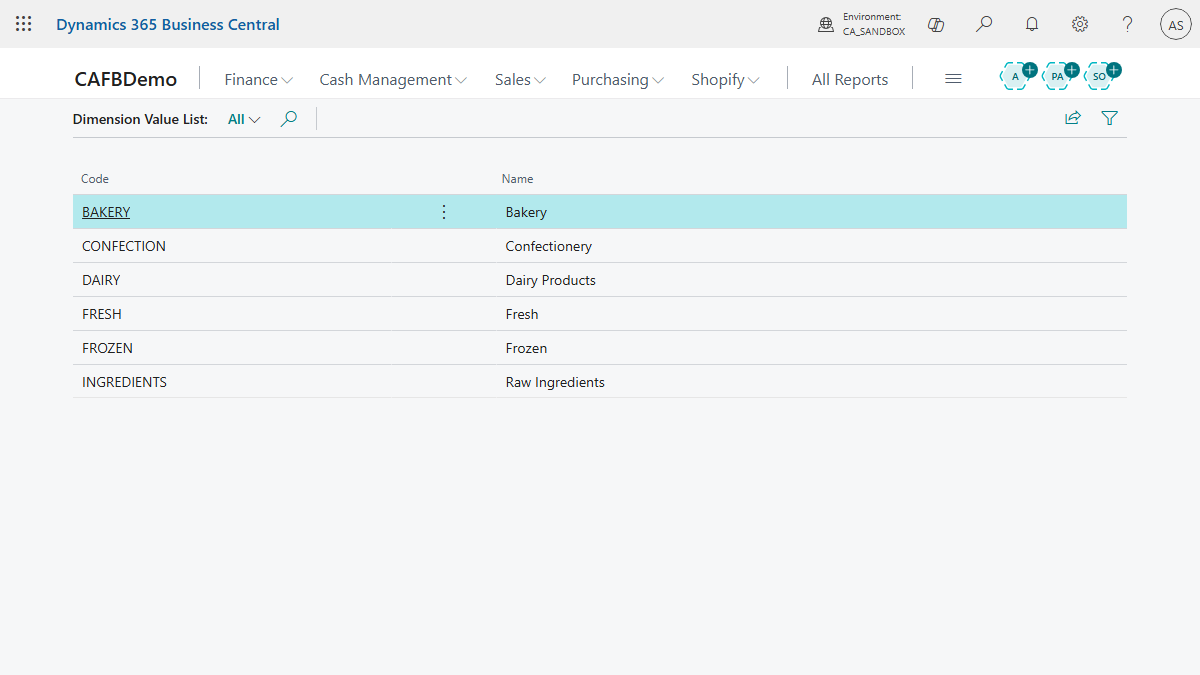
Navigate to Search > Dimensions. Create your dimension codes (PRODUCT-LINE, PLANT, CHANNEL) and their values.
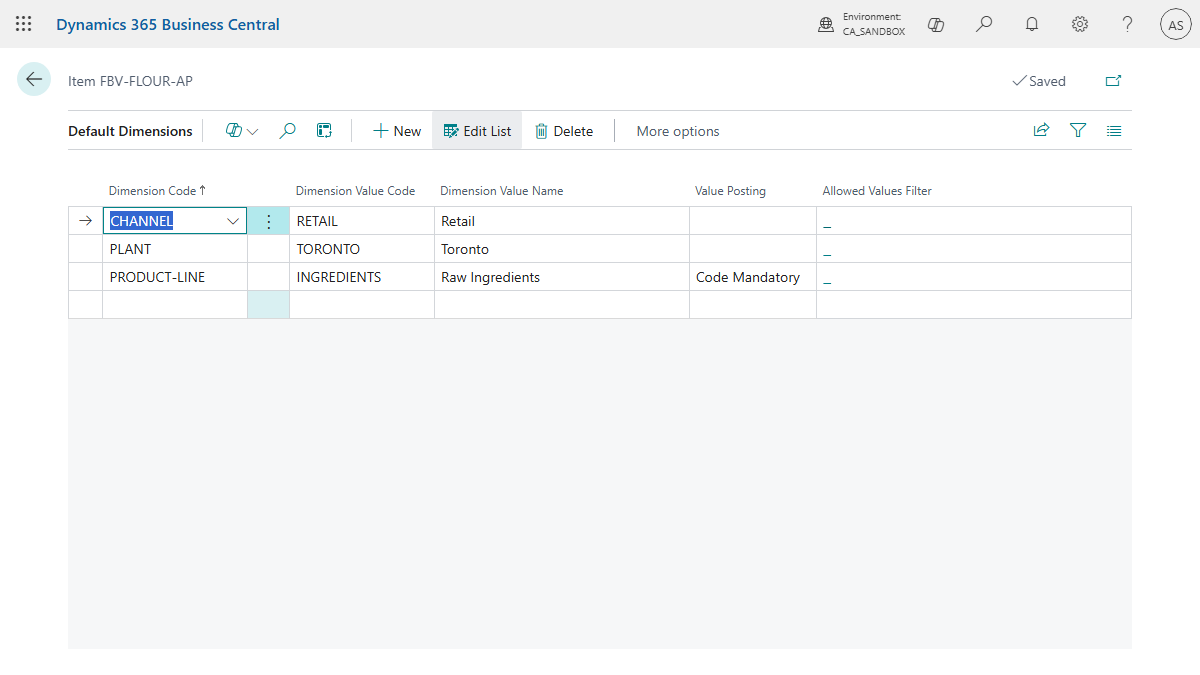
Default Dimensions on Items. This is the most important step. Open the Item Card > navigate to the Dimensions action. Set a default PRODUCT-LINE for every item. When any transaction posts for that item (purchase, production, sale), the dimension attaches automatically. No manual entry needed.
Default Dimensions on Customers. Set a default CHANNEL on each customer record. Every sales transaction inherits the channel. A Loblaws customer gets “Retail.” A food service distributor gets “Food Service.”
Default Dimensions on Locations and Work Centres. Set a default PLANT on each location or work centre. Production costs automatically tag to the correct facility.
Dimension Combination Rules. Navigate to Search > Dimension Combinations. Use these to block invalid combinations. If your Toronto plant doesn’t produce Frozen Dough, block that combination so nobody can post transactions with it.
How Dimensions Flow Through Production
This is where dimensions become powerful for food manufacturers.
- You create a production order for an item. The item’s default PRODUCT-LINE dimension attaches to the order.
- Component consumption lines inherit dimensions from the production order header by default.
- When the operator posts output, dimensions carry to the finished goods inventory entry.
- When the finished good sells, dimensions from both the item (PRODUCT-LINE) and the customer (CHANNEL) combine on the sales entry.
The production order header inherits its dimensions from the finished item. By default, component consumption lines take their dimensions from the production order header. If you need component consumption to carry the component item’s own dimensions instead, configure your default dimension priorities accordingly. For most food cost analysis, the default behaviour (all costs posting under the finished item’s product line) is what you want.
The result: every cost element (materials, labour, overhead) and every revenue transaction carries dimensional data for analysis. No manual tagging after initial setup.
Reporting With Dimensions
Analysis by Dimensions. Navigate to Search > Analysis Views. Select your analysis view (which defines the account range and dimensions to include), then choose the Analysis by Dimensions action. This built-in tool works like a pivot table. Set your dimensions as rows and columns, click Show Matrix, and BC generates the breakdown. “Show me COGS by Product Line and Plant” takes 30 seconds.
Financial Reports (Account Schedules). Build a P&L with dimension filters. A single Financial Report definition can show gross margin by channel, by product line, or by plant. Apply the filter and run.
Practical example: your CFO asks for gross margin on the Pastries product line, Toronto plant, retail channel. With dimensions configured, you open one Financial Report, apply three dimension filters, and the answer appears in seconds. Without dimensions, someone exports GL entries to Excel and spends an hour building a pivot table that nobody fully trusts.
Power BI. Dimensions become your primary slicing axes for dashboards. Build a margin dashboard where the user filters by product line, plant, and channel. The dimensional data is already in every general ledger entry.
Common Gotchas
- Missing defaults. If you forget to set default dimensions on items or customers, transactions post without dimensional data. You can’t analyze what you didn’t capture. Audit your item master for missing defaults before go-live.
- Retroactive changes don’t apply. Updating a dimension value on a master record does not update posted entries. If you reassign items to a new PRODUCT-LINE value, historical data stays under the old value.
- Dimension corrections. BC’s Dimension Correction feature (available since 2021 Wave 1, version 18) lets you fix dimensions on posted general ledger entries. Note that corrections apply to G/L entries only; they do not change dimensions on sub-ledger entries like item ledger entries for the same transaction. Prevention beats correction. Get defaults right during setup.
- Operator friction. Each dimension that isn’t defaulted becomes a manual entry field. Three manual dimension fields on a production journal create fatigue and data quality issues. Default everything you can.
How many dimensions do you typically set up for a manufacturing client? I’ve landed on three as my standard starting point, but I keep getting pulled toward four. What is your sweet spot?
Frequently Asked Questions
How many dimensions should a food manufacturer set up in Business Central?
Three is the standard starting point: PRODUCT-LINE, PLANT, and CHANNEL. Add a fourth for cost centres only if the operation genuinely needs it. More than four and data quality drops because operators skip fields or default them without thinking.
Do dimensions in Business Central flow automatically through production orders?
Yes, if default dimensions are configured on the finished item. The production order header inherits from the item, component consumption lines inherit from the header, and output posts under the same dimensions. No manual tagging after setup.
Can you fix dimensions on posted entries in Business Central?
Partially. The Dimension Correction feature (available since 2021 Wave 1, version 18) fixes dimensions on posted general ledger entries. It does not update sub-ledger entries like item ledger entries for the same transaction. Getting defaults right during setup is much safer than fixing them later.
Do dimensions replace the need for a detailed chart of accounts?
Yes, for most analysis. Without dimensions, you would need a separate revenue and COGS account for every combination of product line, plant, and channel. Dimensions let you keep a clean chart of accounts and filter, group, or slice transactions any way you need.